Android’s Install Flow: A treasure map for exploit crafters
In my previous post, Samsung’s ISVP: Betraying the Trust of Security Researchers, I shared my experience uncovering a vulnerability in Samsung mobile devices that enabled silent app installation.
This flaw allowed non-privileged apps to bypass the android.permission.INSTALL_PACKAGES signature permission, permitting silent application installations, bypassing the user confirmation dialog normally enforced by PackageInstallerActivity
Despite Samsung’s ISVP policy specifying a $50,000 reward for such vulnerabilities, I received only $500, and my follow-up inquiries were ignored. While some recommended publicly disclosing the vulnerability details, doing so would breach the program’s ToS.
Instead, this post examines the general Android app installation process, drawing on publicly available code from AOSP android-15.0.0_r1. The discussion is not specific to Samsung devices or the vulnerability I reported, focusing solely on open-source mechanisms.
Key Components
This section outlines the primary components involved in Android’s application installation process. It focuses on system services, privileged apps, and client interactions, providing a general overview independent of any vendor-specific implementations.
PackageInstallerService
The PackageInstallerService is a core system service that manages application installation sessions. Hosted in PackageInstallerService.java, it provides methods to create, manage, and finalize installation sessions. Key methods include:
-
createSession(sessionParam, installerPackageName, callingAttributionTag, userId): IntCreate a new session using the given parameters, returning a unique ID that represents the session. Once created, the session can be opened multiple times across multiple device boots. The system may automatically destroy sessions that have not been finalized (either committed or abandoned) within a reasonable period of time, typically on the order of a day.
-
openSession(sessionId): IPackageInstallerSessionOpen an existing session to actively perform work. To succeed, the caller must be the owner of the install session.
-
getSessionInfo(sessionId): PackageInstaller.SessionInfoReturn details for a specific session. Callers need to either declare
element with the specific package name in the app's manifest, have the `android.permission.QUERY_ALL_PACKAGES`, or be the session owner to retrieve these details. -
setPermissionsResult(sessionId, accepted)A hidden API for privileged callers to notify
PackageInstallerServicethat the user has approved an installation request, allowing the installation to proceed.
PackageInstallerSession
The PackageInstallerSession class handles the active phase of an installation session, enabling data writing and session finalization. Key methods include:
-
openWrite(name, offset, length): ParcelFileDescriptorOpen a stream to write an APK file into the session. The returned stream will start writing data at the requested offset in the underlying file, which can be used to resume a partially written file. If a valid file length is specified, the system will preallocate the underlying disk space to optimize placement on disk. It’s strongly recommended to provide a valid file length when known. You can write data into the returned stream, optionally call fsync(OutputStream) as needed to ensure bytes have been persisted to disk, and then close when finished. All streams must be closed before calling commit(IntentSender).
-
commit(statusReceiver, forTransferred)Commit the session when all constraints are satisfied. This is a convenient method to combine waitForInstallConstraints(List, PackageInstaller. InstallConstraints, IntentSender, long) and PackageInstaller. Session. commit(IntentSender). Once this method is called, the session is sealed and no additional mutations may be performed on the session. In the case of timeout, you may commit the session again using this method or PackageInstaller. Session. commit(IntentSender) for retries.
PackageInstaller
The PackageInstaller system app (com.android.packageinstaller) facilitates sideloading of applications. It interacts with PackageInstallerService & PackageInstallerSession to provide a user interface for installation prompts and manage the installation process.
OEM Privileged App Stores
Although not the focus of this post, OEM app stores (such as Google Play, Samsung Galaxy Store, Huawei AppGallery, and Oppo/Vivo/Xiaomi stores) typically hold the INSTALL_PACKAGES permission. These stores are common entry points for installing third-party applications, often referred to as app store installations, in contrast to sideloading like PIA or Session Install.
Client Applications
Client apps are non-privileged applications that initiate app installations. They interact with PackageInstallerService and (or) PackageInstaller through APIs or ACTIONs to request installation sessions
Sideloading
Android supports two methods for requesting application installation: PIA and Session Install. These are informal terms used within the AOSP codebase. In this post, PIA refers to the traditional app installation approach utilize the android.intent.action.INSTALL_PACKAGE action, while Session Install denotes a newer API set introduced in Android L. PIA delegates most tasks to the PackageInstaller app, whereas Session Install offers apps finer control over the installation process. Additionally, only Session Install supports multi-package installations, sometimes called splits.
Since PackageInstaller internally uses Session Install to interact with PackageInstallerSession for installations triggered by PIA, I’ll discuss Session Install first.
Session Install
The core APIs for Session Install were covered in the previous chapter. In essence, the process can be summarized as follows:
1
2
3
4
5
6
7
8
9
10
with(packageManager.packageInstaller) {
    val session = openSession(createSession(PackageInstaller.SessionParams(MODE_FULL_INSTALL)))
    session.openWrite("foobar.apk", 0, -1).use(assets.open("magisk.apk")::copyTo)
    session.commit(IntentSender(object : IIntentSender.Stub() { // ⬅️ 1
        override fun send(code: Int, intent: Intent, resolvedType: String?, whitelistToken: IBinder?, finishedReceiver: IIntentReceiver?, requiredPermission: String?, options: Bundle?) {
            // ⬇️ 2
            intent.extras?.getParcelable(Intent.EXTRA_INTENT, Intent::class.java)?.let(::startActivity)
        }
    }))
}
This code initiates a session, writes the apk content, and commits the session. Once commit is called, the PackageInstallerSession workflow starts.
-
PackageInstallerSession.commitPackageInstallerSessiondispatchesMSG_ON_SESSION_SEALED,MSG_STREAM_VALIDATE_AND_COMMIT, andMSG_INSTALLsequentially, each following the completion of the previous step.MSG_INSTALLWhen
MSG_INSTALLis sent, thehandleInstallmethod is invoked. This method callssendPendingUserActionIntentIfNeededto determine if user approval is required.sendPendingUserActionIntentIfNeededInvokes
checkUserActionRequirementto evaluate the need for user action.checkUserActionRequirementUses
computeUserActionRequirementto calculate the user action requirement. For non-privileged apps, the result is typicallyUSER_ACTION_REQUIRED, triggering theIntentSenderto be sent with additional extras, including:Intent.EXTRA_INTENT: The intent the client app must invoke to start the user action process, always pointing toPackageInstallerwith the actionACTION_CONFIRM_INSTALL.EXTRA_SESSION_ID: The current session ID.EXTRA_STATUS: Indicates that the installation is suspended, awaiting user action.
At this point, the installation process is paused (state recorded internally and return), and the
IntentSenderprovided by the client app is triggered. The client app is expected to handle the filled intent and start theIntent.EXTRA_INTENTintent -
PackageInstallerWorkflowThe
PackageInstallersystem app (com.android.packageinstaller) manages the user-facing installation process in Android. When a client app try to resume the installation by starting theEXTRA_INTENTin its intent, the system resolves it to theInstallStartactivity withinPackageInstaller, based on its defined intent filter.1 2 3 4 5 6
<activity android:name=".InstallStart" android:exported="true" android:excludeFromRecents="true"> <intent-filter android:priority="1"> <action android:name="android.content.pm.action.CONFIRM_INSTALL" /> <category android:name="android.intent.category.DEFAULT" /> </intent-filter> </activity>
InstallStartactivity performs initial validation checks and delegates the remaining process toPackageInstallerActivity.-
PackageInstallerActivity
The
PackageInstallerActivityretrieves session details committed by the client app usingPackageInstaller.getSessionInfo(sessionId). It accesses the apk file saved byPackageInstallerService, typically located at/data/app/vmdl${random-digital}.tmp/base.apk. The activity parses the apk to extract metadata, such as the application’s icon and name, and displays a dialog prompting the user to confirm or cancel the installation.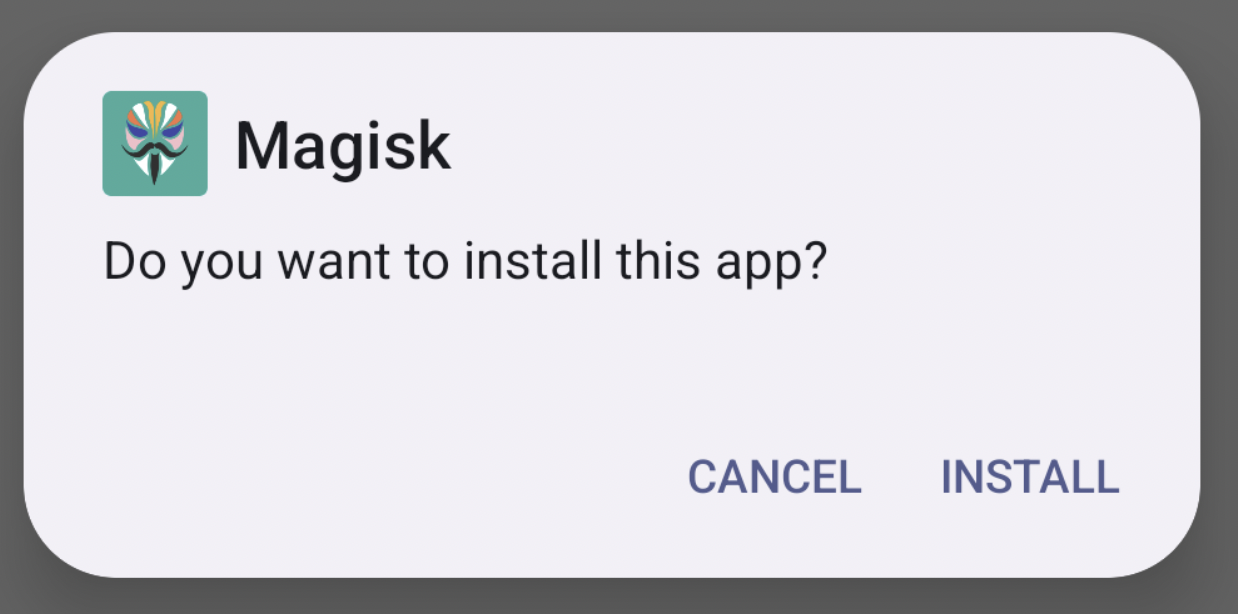 ,
,1 2 3 4
* Hist #1: ActivityRecord{1a9977 u0 com.android.packageinstaller/.PackageInstallerActivity t191} * Hist #0: ActivityRecord{59b2c54 u0 play.ground/.IndexActivity t191} * Hist #0: ActivityRecord{5bbee2e u0 com.android.launcher3/.uioverrides.QuickstepLauncher t178} * Hist #0: ActivityRecord{197f44f u0 com.android.dialer/.main.impl.MainActivity t187}When the user clicks “Install” in the dialog,
PackageInstallerActivityrecords aRESULT_OKstate and call the overriddenfinish. OnRESULT_OK,finishcallsPackageInstaller.setPermissionsResult(mSessionId, true)via AIDL, promptingPackageInstallerServiceto locate the session bysessionId, set itsmPermissionsManuallyAcceptedflag totrue, and resume the suspended installation process, completing the installation smoothly.The
setPermissionsResultmethod, restricted to apps with theINSTALL_PACKAGESpermission, ensures only privileged components likePackageInstallercan approve user-authorized installations, maintaining security by preventing unauthorized apps from manipulating the process.
-
PIA
While google is refactoring the process and UI, guarded by the pia_v2 flag, but this is not yet enabled. This discussion focuses on the traditional installation process.
Internally, PIA functions similarly to a session-based installation but offers developers a simpler and more convenient API. PackageInstaller handles most tasks for the client app, including creating the session, copying the apk stream to the session, and committing the session.
The installation process involves the following steps:
-
Initiating Installation:
- The client triggers an installation by sending an intent with the action
android.intent.action.INSTALL_PACKAGE, specifying a content URI as the data source.
- The client triggers an installation by sending an intent with the action
-
Handling the Intent:
- The
PackageInstallerreceives the intent and processes it through theInstallStartactivity, configured as follows:
1
2
3
4
5
6
7
8
9
10
11
<activity android:name=".InstallStart"
            android:exported="true"
            android:excludeFromRecents="true">
        <intent-filter android:priority="1">
            <action android:name="android.intent.action.VIEW" />
            <action android:name="android.intent.action.INSTALL_PACKAGE" />
            <category android:name="android.intent.category.DEFAULT" />
            <data android:scheme="content" />
            <data android:mimeType="application/vnd.android.package-archive" />
        </intent-filter>
</activity>
- The
-
Staging the apk
- After validating and extracting necessary parameters, the
InstallStartactivity launches theInstallStagingactivity to prepare the apk for installation. This includes:- Creating session parameters for the installation.
- Displaying a progress dialog for staging.
- Copying the apk payload to a
PackageInstallSession. - Retrieving the resolved base apk file path (generated by
PackageInstallSession) and passing it to thePackageInstallerActivity.
- After validating and extracting necessary parameters, the
-
User Confirmation:
The
PackageInstallerActivitypresents a confirmation dialog to the user. Once the user confirms the installation, control is passed toInstallInstalling, which handles the final phase of committing the session and completing the installation. -
Completing the Installation: The
InstallInstallingactivity invokesPackageInstallationSession.commit(IntentSender, forTransfer)to finalize the installation. Unlike a standard session-based installation, this session is created and commited byPackageInstaller, which holds theINSTALL_PACKAGESpermission. As a result, thecomputeUserActionRequirementmethod returnsUSER_ACTION_NOT_NEEDED, allowing the installation to proceed without suspension.1 2 3 4 5 6 7 8 9 10 11 12 13 14 15 16 17 18 19 20 21 22 23 24 25 26 27 28 29
@UserActionRequirement private int computeUserActionRequirement() { ... // For the below cases, force user action prompt // 1. installFlags includes INSTALL_FORCE_PERMISSION_PROMPT // 2. params.requireUserAction is USER_ACTION_REQUIRED final boolean forceUserActionPrompt = (params.installFlags & PackageManager.INSTALL_FORCE_PERMISSION_PROMPT) != 0 || params.requireUserAction == SessionParams.USER_ACTION_REQUIRED; final int userActionNotTypicallyNeededResponse = forceUserActionPrompt ? USER_ACTION_REQUIRED : USER_ACTION_NOT_NEEDED; ... final boolean isInstallPermissionGranted = (snapshot.checkUidPermission(android.Manifest.permission.INSTALL_PACKAGES, mInstallerUid) == PackageManager.PERMISSION_GRANTED); // ⬅️ ... final boolean isPermissionGranted = isInstallPermissionGranted || (isUpdatePermissionGranted && isUpdate) || (isSelfUpdatePermissionGranted && isSelfUpdate) || (isInstallDpcPackagesPermissionGranted && hasDeviceAdminReceiver); ... if (isPermissionGranted) { return userActionNotTypicallyNeededResponse; // ⬅️ } ... }
Conclusion
Android’s sideloading process, whether Session Install or PIA, hinges on strong user consent in PackageInstaller, gated by the INSTALL_PACKAGES privilege permission, orchestrated by system services like PackageInstallerService, form a critical security barrier
My experience with Samsung’s ISVP revealed a silent installation vulnerability that bypassed user interaction. Such exploitation patterns have significant real-world implications if adopted by threat actors. When OEMs modify AOSP code to serve commercial interests without sufficient security testing, the consequences can be severe. In these cases, collaboration with security researchers isn’t optional, it’s essential.
Engage sincerely with white-hat researchers and honor your commitments, repeated disappointment and broken promises will ultimately erode your reputation.